LYD AssistOS / Features / NDIS CRM
CRM for NDIS providers
An NDIS CRM for provider owners.
Referrals do not arrive in one tidy pile. A support coordinator sends an email. A family phones the office. Someone fills in the form on your website. An NDIS CRM is where those participant enquiries are kept, from the opening message through to a signed client.
Key facts
- LYD AssistOS is for provider businesses. It does not deliver supports to participants.
- The CRM is a pipeline with stages, owners and reminders, plus contact records and user accounts for the team.
- Calls, SMS, chat, email and social messages sit in one thread per contact.
- Missed-call text-back sends an SMS within seconds. An AI chat assistant, trained on your services, answers on the site around the clock.
- Monthly reporting covers enquiries, sources and conversion. What is switched on varies by plan.
- It is part of the Launch Your Dream Series by Sharktech Global.
What should a CRM do for an NDIS provider?
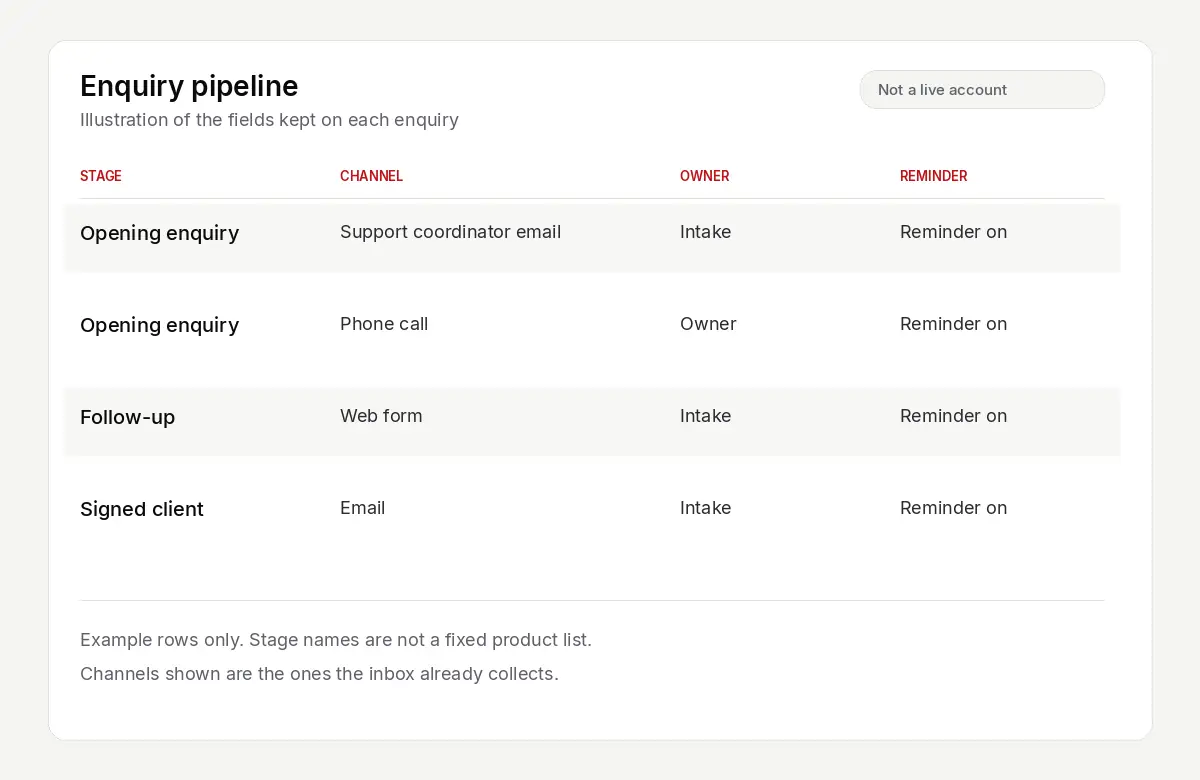
A CRM for an NDIS provider should hold every enquiry in one record, name who owns it, and keep a reminder so it is not forgotten. In LYD AssistOS that is a pipeline with stages, owners and reminders, plus contact records and user accounts for the team.
The website, review requests and search pages are listed on the features page. This page stays with the pipeline, the inbox and the follow-up. What is switched on still varies by plan.
How is an NDIS CRM different from rostering or claiming software?
Rostering software schedules shifts. Claiming software bills the plan. An NDIS CRM tracks the enquiry that comes before either job: who made contact, what they asked for, and whether they became a client. LYD AssistOS sits alongside the systems you already run. It does not replace them.
The how it works page shows the connect step: CRM, booking calendar, AI chat, missed-call text-back and your Google Business Profile. A rostering connector is in development and is not released, so a converted enquiry is still re-typed. Connecting rostering, notes, claiming and payroll is covered in the guide to connecting care systems.
How do referrals from support coordinators get tracked?
A referral from a support coordinator may arrive as an email, a phone call, an SMS or a message on social. Web forms from families arrive the same way. Each of those channels lands in one inbox, as one thread per contact, and then moves onto the pipeline with an owner and a reminder.
Missed-call text-back sends an SMS within seconds if the phone is not answered. The missed call text back page covers the wording and the follow-up. The AI chat assistant, trained on your services, answers on the website around the clock, and the mobile app runs the inbox and the pipeline. See the referral playbook and the after hours article.
What about participant privacy?
An enquiry can include a person's name, phone number and the support they asked for. That is personal information, and for a disability provider it is often health information. The Privacy Act and the NDIS Practice Standards both apply in general terms to how that information is handled. This page is not legal advice.
User accounts give pipeline access to the people who work the enquiry. They do not replace the Privacy Act or the Practice Standards. Those duties are set out in the Privacy Act article.
How does follow-up keep an enquiry from going cold?
Automated follow-up runs so an enquiry does not stall because nobody remembered the next step. Reactivation campaigns can go back to past enquiries. Each month, reporting shows enquiries, sources and conversion, which is how you see whether coordinator referrals, calls or the website form are producing signed clients.
What is switched on depends on the plan. Book a demo, or open the live demo site, and compare the inbox and the stages with the way enquiries reach you today.
Who is this NDIS CRM for?
It is for the owner running an NDIS provider, registered or unregistered. That includes a new provider whose enquiries still live in a personal inbox, and an established provider whose referrals arrive and then sit with no owner. It is the same customer the rest of LYD AssistOS is built for: the business, not the participant.
It also fits an owner paying a web developer, a review tool and a separate CRM that were never built to share one enquiry.
Built by Sharktech Global. LYD Assist is the NDIS edition of Launch Your Dream.
Questions provider owners ask.
Is this CRM for participants?
No. It is for the provider business, and it does not deliver supports to participants.
Does an NDIS CRM replace rostering or claiming software?
No. It tracks the enquiry and runs alongside rostering and claiming. A rostering connector is in development and is not released.
How are referrals from support coordinators tracked?
They land in one inbox, as one thread per contact, then move onto the pipeline with a stage, an owner and a reminder.
What privacy duties apply to these enquiry records?
In general terms, the Privacy Act and the NDIS Practice Standards. This page is not legal advice.
Can the team work the pipeline from a phone?
Yes. The mobile app runs the inbox and the pipeline. What is switched on varies by plan.
How can an owner see the CRM before deciding?
Book a demo or open the live demo site. The features page lists the rest of the subscription.
See the pipeline against your own enquiries.
Book a demo and look at the inbox, the stages and the follow-up mapped to the way referrals reach you today.